
Quick answer: To reduce hotel lobby congestion with kiosks, move routine arrivals off the front desk in five steps: let a self-check-in kiosk handle registration, payment, and room keys; switch on pre-arrival web check-in so guests arrive with the paperwork done; connect the kiosk to your PMS so payments post to the folio automatically; let it serve walk-ins too; and place it where the queue forms, with staff kept free for the guests who need real help. In our own kiosk deployments, pairing these steps with pre-arrival check-in has cut queues by up to 65.7%. That is the whole method. The rest of this guide explains each step and what to check before you buy.
Why does the lobby jam at peak arrival?
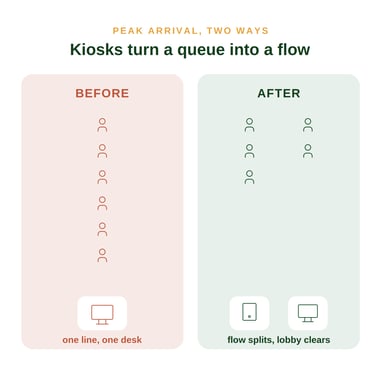
Congestion is rarely an all-day problem. It is a two or three hour window, usually mid to late afternoon, when coaches, flights, and self-drive guests arrive at once. One agent processes one guest at a time. Everyone else waits, and the queue is the first thing a tired guest remembers.
In Malaysia, the pressure is sharper, because the staffing maths is against you. The hospitality sector runs an attrition rate of around 22.2%, above the national average, while Visit Malaysia 2026 targets 35.6 million arrivals. More guests, fewer hands at the desk. You cannot hire your way out of that. You have to change the flow.
How do you reduce congestion with a kiosk?
1. Move routine check-in to the kiosk.
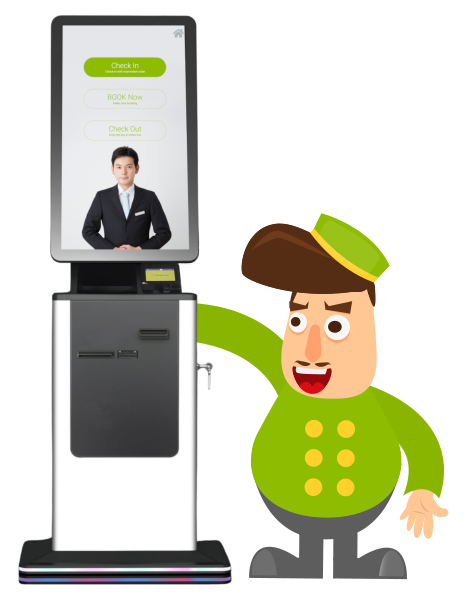
Let guests register, pay, and collect a key on their own. Softinn's kiosk, (driven by FATboy), connects to a room key encoder, a MyKad reader, and a passport scanner, so a guest can complete the whole arrival without a staff member typing anything.
2. Switch on pre-arrival web check-in.
The biggest congestion drops happen before the guest even reaches the lobby. Send a registration link 24 to 48 hours ahead so guests arrive with their details already in. The kiosk then just confirms them and issues a key. I believe this is the step most owners skip, and it is the one that matters most: a kiosk without pre-arrival check-in still makes each guest do the work on site.
3. Connect the kiosk to your PMS.
This is what separates a real fix from a second queue. The kiosk should read live availability and rates from your PMS and push every payment straight to the guest folio. With FATboy, payments record to the folio automatically and housekeeping is notified on check-out, so nothing needs re-keying at the desk. A kiosk that does not talk to your PMS just moves the congestion into your back office.
4. Let the kiosk serve walk-ins.
Walk-in guests are a real share of arrivals in the region. A kiosk that lets them book and pay on the spot keeps them out of the same queue as everyone else, instead of only serving guests who already have a booking.
5. Place it where the queue forms, and nudge guests to it.
A kiosk nobody notices does nothing. Put it in the arrival path, add clear signage, and have staff point guests to it during the rush. Regional guests are ready for this: a 2025 study of 384 hotel guests in Malaysia found that practical factors, ease of use and performance are what drive guest satisfaction with kiosks.
Keep staff for the exceptions. The goal is not a front-desk-less lobby. It is a hybrid one, where the kiosk absorbs routine arrivals, and your team keeps the high-touch moments: the upgrade, the late arrival, the guest with a genuine problem.
Free resource: Not sure your current system is ready to support a kiosk? Download the Softinn PMS Buyer's Toolkit, a practical checklist for choosing a property management system that a kiosk can actually plug into.
What should you check before choosing a kiosk?
The hardware is the easy part. Integration is where kiosk options win or lose. Before you compare screens and casings, check that a kiosk can:
- Connect to your PMS, reading live availability and posting payments to the folio.
- Talk to your door locks, so it can issue a key, not just check a guest in.
- Serve walk-ins, booking and taking payment on the spot.
- Offer a fallback when hardware fails: emergency contact, staff notification, a manual override at the desk.
- Support your guests' languages. In Malaysia that usually means English, Malay, and Chinese, so multi-language support is a requirement, not a nice-to-have.
Based on my observation, a kiosk that does not connect to the systems you already run will create more work. Softinn's kiosk is built around the Softinn PMS for this reason, so the connection is not something you have to engineer yourself.
How much congestion can you actually remove?
Enough to change how your peak feels. In Softinn kiosk deployments, we have measured queue reduction of up to 65.7%, and that result comes from pairing the kiosk with pre-arrival web check-in, exactly as in steps 1 and 2 above.
The honest read: your result depends on how many of your arrivals are routine. The higher that share, the more a kiosk moves the needle. Get it right and your busiest afternoon stays calm, which is what makes the business more predictable and profitable.
What is a clearer lobby actually worth?
I believe the real payoff is not only a shorter queue. It is what the space and the staff time become once the queue is gone.
- Free floor space.
- The strip of lobby that used to hold a line can become a welcome-drink counter, a small retail display, a comfortable seating nook, or a screen promoting your own offers.
- Free staff attention.
- Instead of processing arrivals, your team can have the conversations that actually earn money: the room upgrade, the late checkout, the dinner booking, the day tour.
- A place to upsell your own products.
- This is where a cleared lobby pays for the kiosk. Local experience packages an OTA cannot list, such as a cooking class, a sunrise trek, or a batik workshop, sell best face to face, in a relaxed lobby, by staff who finally have time to offer them. A good kiosk can also prompt upgrades and extras during self-check-in, so part of the upsell happens on the screen before your team even steps in.
I believe the the queue you remove is floor space and staff hours you get back, and both are worth far more pointed at your own direct offers than at a printer and a stack of registration cards. That is what turns a calmer lobby into a more predictable and profitable one.
FAQ
-
Do self-check-in kiosks replace front desk staff?
-
No. They remove the routine part of check-in so your team can focus on guests who need real help. Most small hotels run a hybrid lobby: kiosk plus staff.
-
-
What is the single most important thing to check?
-
PMS integration. A kiosk that posts payments to the folio and reads live availability saves work. One that does not just adds a system to reconcile.
-
-
Can a kiosk handle walk-in guests?
-
Yes, if it is built for it. Look for one that lets walk-ins book and pay on the spot, not only collect a pre-booked key.
-
Read also


Tai Pei Shi
Hi, I am Pei Shi. I am a Technopreneurship student and digital marketing intern in Softinn.
Comments
Recent Posts
How to Reduce Hotel Lobby Congestion With Kiosks
The Hotel Guide to Meta Business Agent and Automation (2026)
Hotel PMS Payments for Faster Check-In in 2026
Direct Hotel Booking Strategy for Small Hotels
What to Automate First in Hotel Operations