
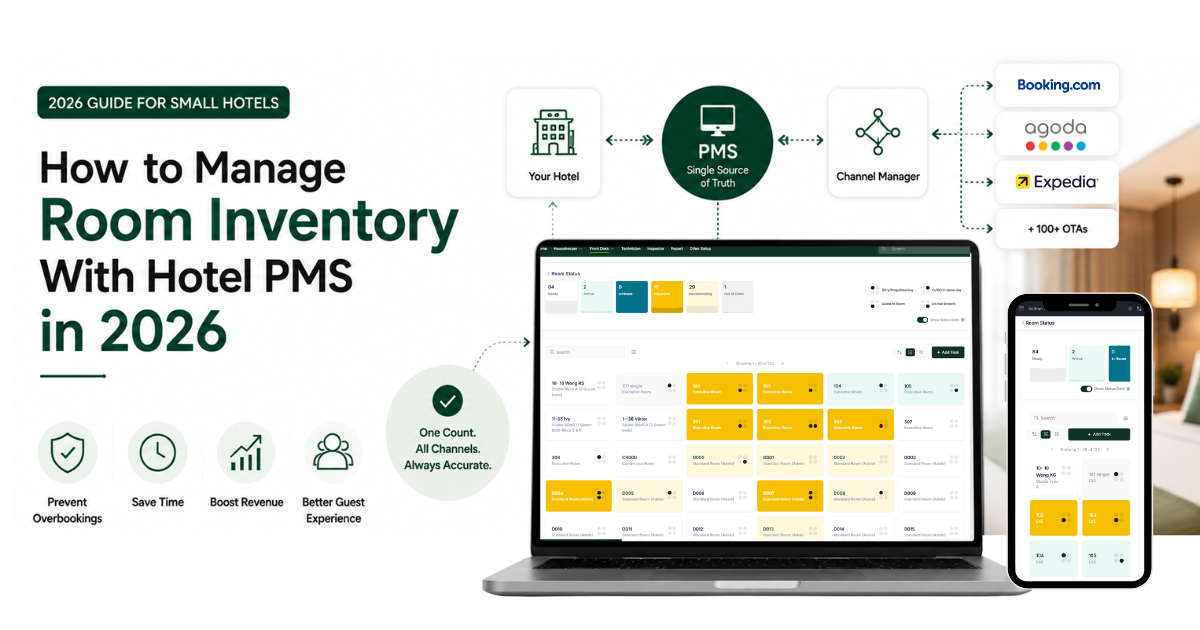
Quick answer: Room inventory management is how a hotel controls the number of rooms it has for sale at any moment. A hotel property management system (PMS) handles this by keeping one live count of your rooms and updating it the instant a booking, cancellation, or walk-in happens. When your channel manager and booking engine connect to the PMS, every channel reads from that same count. That single shared number is what stops two guests from booking the same room on the same night.
Room inventory sounds simple until you are selling on five channels at once. A booking comes in on Booking.com, another on Agoda, a walk-in shows up at the front desk, and a guest cancels through your own website. If those four events do not update one shared count fast enough, you have sold a room you do not have. This guide explains how a hotel PMS keeps that count accurate, and how to set it up so overbooking becomes very hard to do by accident.
Why does room inventory get out of sync?
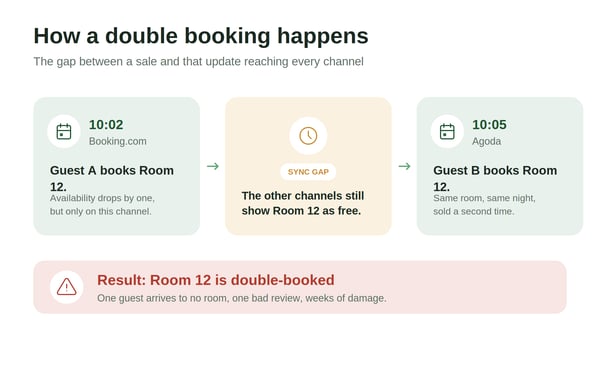
Overbooking is rarely bad luck. It is almost always a timing gap.
When you manage availability manually across several online travel agencies (OTAs), there is a delay between a booking landing on one platform and that update reaching the others. A second guest can book the same room inside that window. The risk climbs during peak periods, when many reservations arrive in a short time.
The root cause is consistent for small hotels: availability data that is out of sync across channels. A single overbooking at an independent property is worse than at a large chain, because you have nowhere to send a displaced guest, and the bad review can affect bookings for months.
How does a hotel PMS manage room inventory?
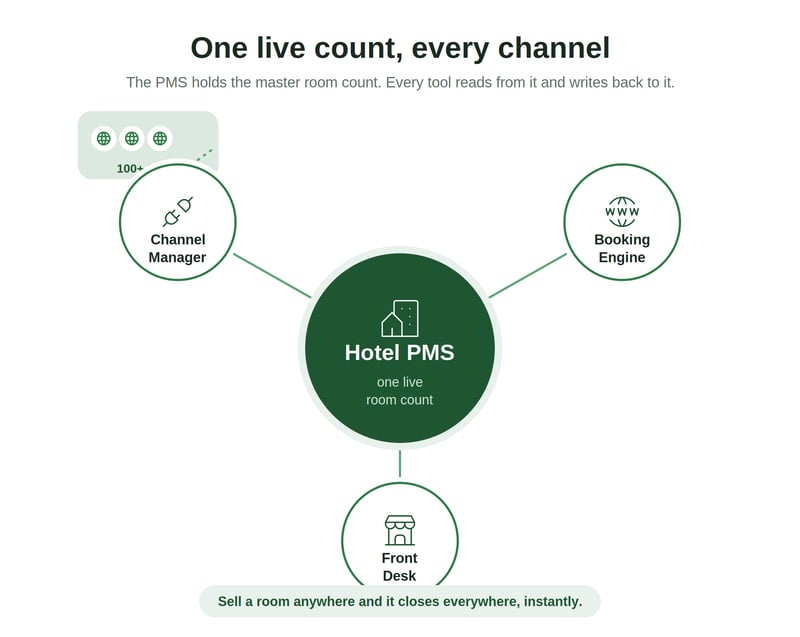
The PMS is your single source of truth for how many rooms are open.
Instead of tracking availability in a spreadsheet or in your head, the PMS holds one live number for each room type. Every event that changes availability, a new reservation, a cancellation, a walk-in, an early check-out, adjusts that number once. Your team always reads from the same place.
This matters because Softinn's Channel Manager and Booking Engine are separate products that integrate with the PMS. They do not replace it, and they do not hold their own private count. The PMS stays the master record, and the other tools read from it and write back to it.
How does a PMS prevent overbooking across direct and OTA bookings?
The answer is real-time, two-way sync.
When your PMS connects to a channel manager, a sale on any channel instantly reduces availability everywhere else. Sell the last room on Agoda, and the channel manager closes that room on Booking.com, your website, and every other connected platform before a second guest can grab it. Softinn's Channel Manager connects to 100+ OTAs and syncs rooms and rates in real time, so the count on every channel matches the count in your PMS.
Your direct bookings are protected the same way. When the Booking Engine connects to the PMS, it sells from the same live inventory, and it adjusts down automatically when rooms run low. That keeps your own website from selling a room the OTAs already took.
Free resource: PMS and OTA Room Mapping Excel Template
Mapping your room types correctly is the single most common fix for sync errors. Use our free template to line up every room type across your PMS and your OTAs before you connect them.
What does the latest data say about room inventory risk?
The numbers make the case for accuracy stronger than ever.
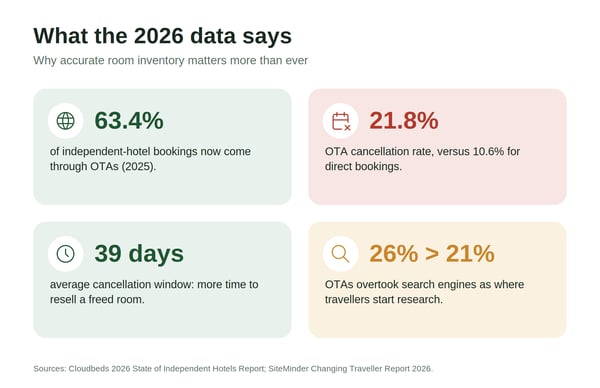
OTA reliance is rising. In 2025, the OTA share of independent hotel bookings reached 63.4%, with some markets approaching 80%. More channels feeding into your inventory means more chances for a sync gap if your systems are not connected.
Cancellations behave very differently by channel. In 2025, OTA bookings were cancelled at 21.8%, more than double the 10.6% rate for direct bookings. The upside is timing: the average cancellation window widened to 39 days, which gives you more notice to resell a room, but only if your systems reopen that room across every channel the moment it frees up.
Discovery is shifting too. For the first time, OTAs overtook search engines as the place travellers start their hotel research, at 26% versus 21%. Encouragingly, 18% of travellers who begin on an OTA go on to book directly. That mix of channels only works cleanly when they all draw from one accurate inventory count.
Where I stand
I believe room inventory accuracy is not a feature. It is the foundation everything else sits on. A hotel can have beautiful photos, sharp rates, and a fast website, and still lose a guest and a review to one double booking. Get the count right first.
I believe every hotel should own one source of truth and let its tools read from it, rather than juggling separate counts on separate platforms. Softinn's own customer data reflects this: 49.76% of our customers connect their PMS directly to a channel manager, and 43.52% run without heavy OTA reliance by growing their direct channel. Both paths work when the inventory behind them is one shared, live number.
This is a fit-over-features view. The goal is not the longest OTA list. The goal is a distribution setup that matches how your property actually sells, and that you can trust during a full-house weekend.
How to set up reliable room inventory management
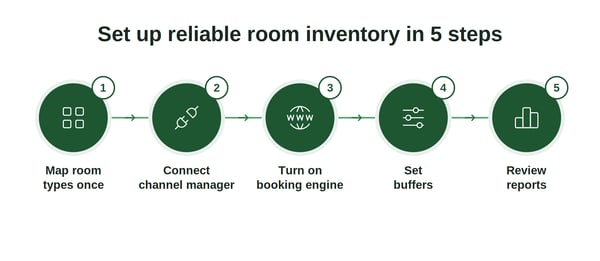
A clean setup takes five steps.
- Map your room types once, carefully. Match each room type in your PMS to the matching room on every OTA. Most sync problems trace back to this step.
- Connect your channel manager to your PMS. This gives you real-time, two-way sync so a sale on any channel updates all the others.
- Turn on your booking engine. Let your own website sell from the same live inventory, so direct bookings never clash with OTA bookings.
- Set buffers and stop-sell rules. Hold back a room or two during high-risk periods, and pause channels when you sell out, so you stay in control.
- Review your reports. Check your availability and cancellation reports regularly, and resell freed-up rooms quickly while the cancellation window is still open.
Frequently asked questions
-
Does a PMS stop overbooking on its own?
-
A PMS keeps one accurate count for the bookings you record in it, which prevents front desk and walk-in overbooking. To stop overbooking across OTAs, the PMS needs to connect to a channel manager so every channel updates in real time.
-
-
Can a small hotel manage inventory without a channel manager?
-
Yes, if you sell on only one or two channels and update them manually with care. Once you list on several OTAs plus your own website, manual updates leave a gap where double bookings happen, and a channel manager closes that gap.
-
-
How fast should inventory sync?
-
Fast enough that simultaneous bookings cannot both go through. Quality systems update within seconds to a couple of minutes. Updates that take hours are a real overbooking risk.
-
-
Is the booking engine part of the PMS?
-
No. Softinn's Booking Engine is a separate product that integrates with the PMS. It sells your rooms directly on your website using the same live inventory the PMS holds, which is why direct and OTA bookings stay in sync.
-
The takeaway
One accurate count, shared by every channel, is what separates a smooth full-house weekend from an overbooking and a bad review. Map your rooms once, connect your channel manager and booking engine to the PMS, and let one number do the work. If you want a head start, the Room Mapping Excel Template gets your room types lined up before you connect anything.
Read Also


Tai Pei Shi
Hi, I am Pei Shi. I am a Technopreneurship student and digital marketing intern in Softinn.
Comments
Recent Posts
Hotel Wi-Fi PMS Integration: Give Every Guest Their Own Password, Automatically
AI Won't Run Your Hotel. But It Can Help You Run It Better.
Google AI Mode for Hotels: What Hotel Owners Need to Know
When the Minimum Wage Goes Up, What's Your Hotel's Next Move?
Why Hotels Should Offer Reserve Now, Pay Later to Guests