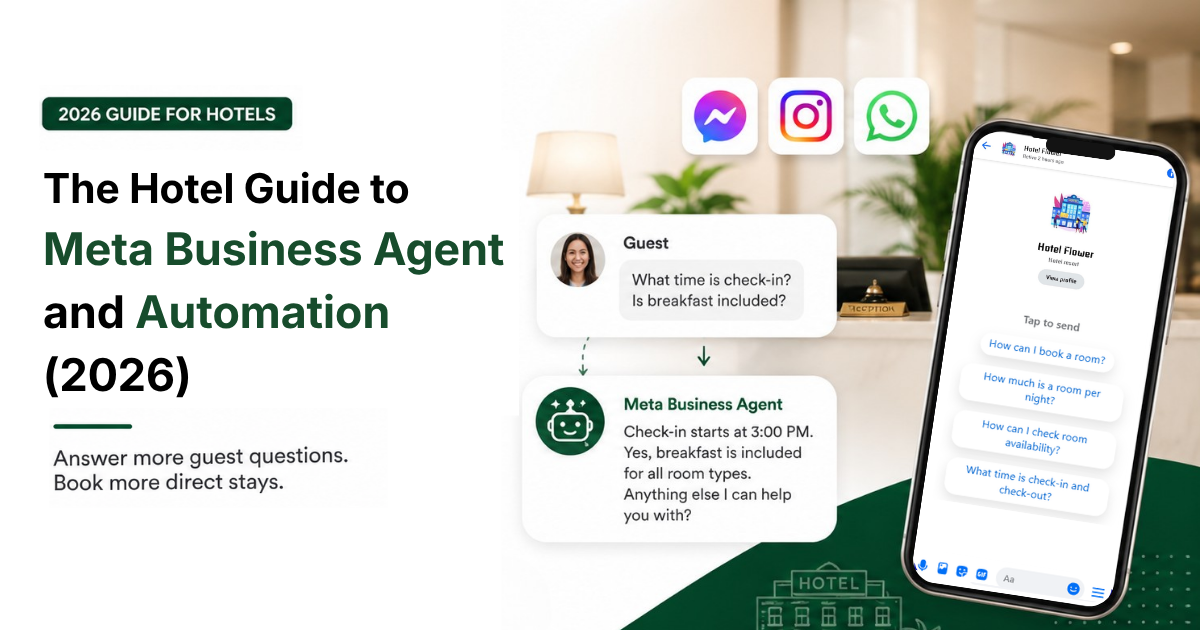
A Meta Business Agent answers your guests' most common questions automatically, on Facebook, Instagram, and WhatsApp, straight from Meta Business Suite. It replies in seconds, 24/7, so no enquiry sits unanswered overnight and no simple question ties up your front desk. This guide walks through the full setup of Meta Automation and Meta Business Agent, the difference between them, and gives you two free, ready-to-paste templates: one for Automations, one for Meta Business Agent.
What is the Meta Business Agent?
The Meta Business Agent (Previously shown as Business AI inside Meta Business Suite) is Meta's own AI for business messaging. Meta launched it globally on 3 June 2026, following its announcement at the Conversations 2026 conference in London.
It runs across Facebook Messenger, Instagram Direct and WhatsApp: it reads guest messages, answers with the information you give it, and passes the chat to a human when needed. The Meta Business Suite supports multiple languages and automatically detects and matches the customer's language, or it can be set to a specific language through Meta Business Suite Settings.
To handle guest messages without adding front-desk workload, Meta Business Suite gives you Automations to provide instant, rule-based replies, while Meta Business Agent handles AI-powered conversations. They live in the same place and deliver the best results when paired together, but you set them up very differently. Here is how to choose which tool handles what.
Meta Business Agent vs Automations: know this before you set anything up
-png.png?width=800&height=413&name=infographic-5-businessai-vs-automations%20(2)-png.png)
Automations are rule-based.
They handle structured, predictable messages by triggering precise, pre-written replies the moment a guest taps an option or hits a keyword.
This guide uses one feature in particular: Frequently Asked Questions (FAQ).
You give Automations a list of Questions → fixed answer pairs. Nothing is generated: the guest gets the exact text you wrote.
This is where our Automations FAQ Template goes.
Meta Business Agent is generative.
Instead of following fixed scripts, it reads a guest's message in plain language, works out what they mean, and writes its own answer from a knowledge document you provide, plus the tone and rules you set.
It handles questions you never scripted and can hold a short back-and-forth.
Because it learns from a source-of-truth document rather than fixed pairs, it relies on our separate Meta Business Agent Instruction Sheet to guide its behavior, boundaries, and tone.
When should a hotel use automations, and when Meta Business Agent?
You do not have to choose. The two do different jobs, and a hotel wins by running both. Use automations for the predictable questions in this list, check-in times, parking, breakfast, cancellation policy, where the answer is fixed and repeats all day. Let Meta Business Agent handle the free-form questions your keywords miss. The point is not to pick one. It is to cover the basics with certainty, and everything else with understanding.
Why should hotels use it?
Your front desk answers the same questions all day: rates, check-in time, parking, breakfast, directions. Many arrive at 11 pm when nobody is at the counter, and a slow reply is a lost booking. In Malaysia, this matters even more, with 78% of people messaging a business every week, often switching between English and Bahasa Malaysia in the same chat. An AI agent replies instantly, day or night, without adding headcount.
Before you start
Three things, ready first:
- Admin access in Meta Business Suite. You need Admin (Full Control) of the Page. Check yours under Settings > People.
- Your Facebook Page and Instagram are connected to the same account.
- Your source information. Your rates, times, policies, and directions in one clean document. Both tools work only with what you give them. Use it as set questions and answers in the FAQ automation, and as the facts behind the Meta Business Agent. Our kit adds the rest: the FAQ template, and the Instruction Sheet that sets the Agent's tone, topics to avoid, and custom instructions.
Step-by-step setup
We've built a Hotel Meta Reply Kit that addresses the questions hotel guests usually ask.
One download, two ready-to-paste templates:
- Hotel FAQ Template: Questions → fixed answer template for your Automations
- Meta Business Agent Instruction Sheet: tone, topics to avoid, and custom instructions for your AI
Track A: Set up Automations(Frequently Asked Questions)
Step 1: In Meta Business Suite, navigate to Inbox → Automations → View All → Frequently Asked Questions.
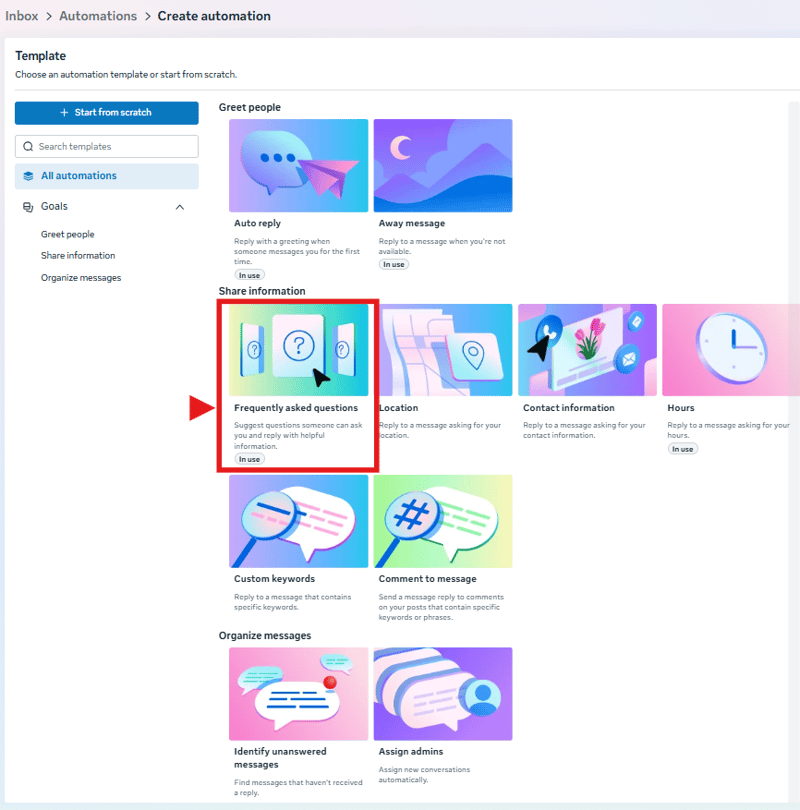
Step 2: Select your desired platform channels (Messenger, Instagram, WhatsApp).
Step 3: Paste questions and answers from the Hotel FAQ Template.
You can review how your FAQs look in the live preview panel on the right.
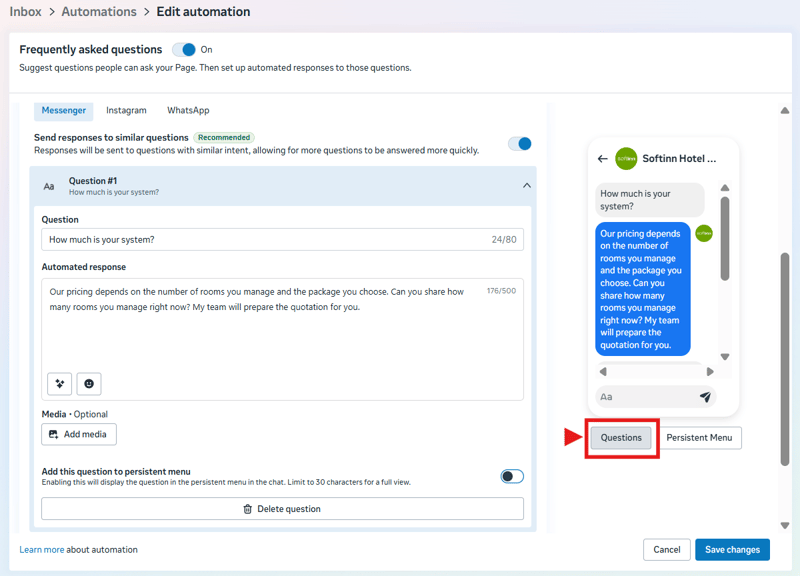
Step 4: Enable Add to Persistent Menu so guests can easily select FAQs from a menu list during chat.
Click on save changes (you can test, edit, or remove questions anytime).
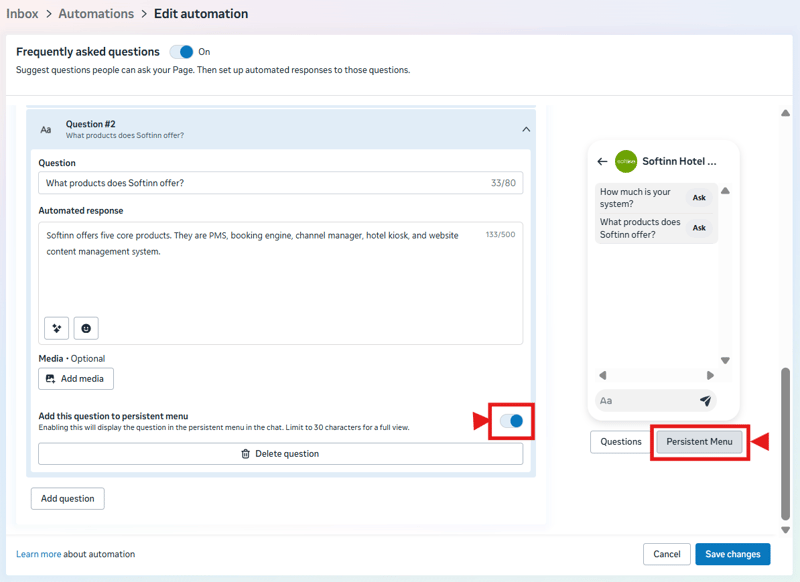
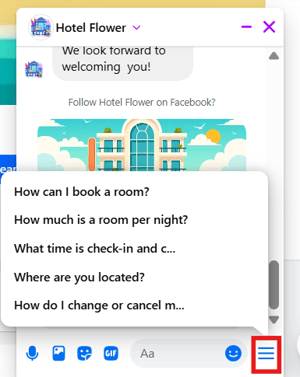
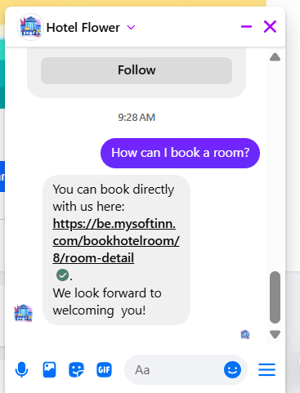
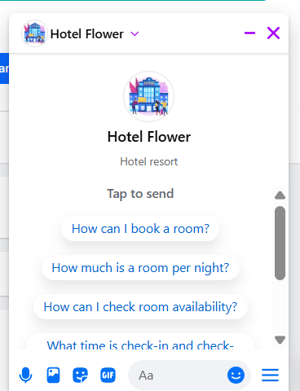
*Important Note: You can only set a maximum of 5 persistent questions. Guests must ask the exact questions (including matching uppercase and lowercase letters), so we suggest selecting 5 primary questions from our template. Guests can then easily ask them by tapping the menu in the bottom-right corner of the chatbox. (image 1 & image 2)
*When a first-time user opens a fresh chat, Meta automatically displays the FAQ menu on-screen without requiring any special settings. (image 3) Once the user starts the conversation, it will disappear.
Track B: Set up Meta Business Agent
For a visual walkthrough, watch the setup video inside Meta Business Suite.(Business AI has been renamed to Meta Business Agent)
-png.png?width=800&height=277&name=infographic-1-setup-flow%20(1)-png.png)
Step 1: Open Meta Business Agent.
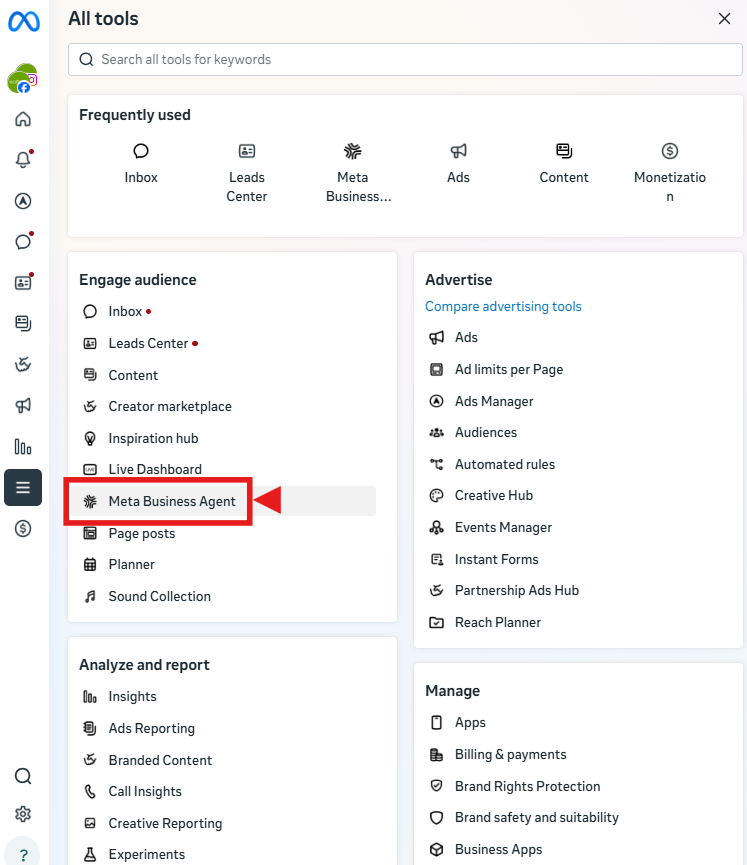
In Meta Business Suite, click All tools, choose Meta Business Agent, then tap Get started.
Step 2: Review the information.
Meta Business Agent pulls details from your Page. Check it, fix anything wrong, and tap Next.
Step 3: Turn on AI responses.
Tap Turn on AI responses. From here, it starts replying to guests on Messenger automatically.
Step 4: Help the AI learn.
Add your products, price list, policies, and photos. Coach it by chatting as if you were a guest and correcting weak answers. When an answer is wrong, fix the source information, not the question. On top of those facts, add the Meta Business Agent Instruction Sheet, the second template in the kit, which sets its tone, the topics it should hand to a human, and your custom instructions.
How to coach and train your Meta Business Agent
Meta Business Agent is only as good as what you teach it, and it is yours to shape. This is not a one-time setup either: you train it over time, the way you would coach a new front-desk hire.
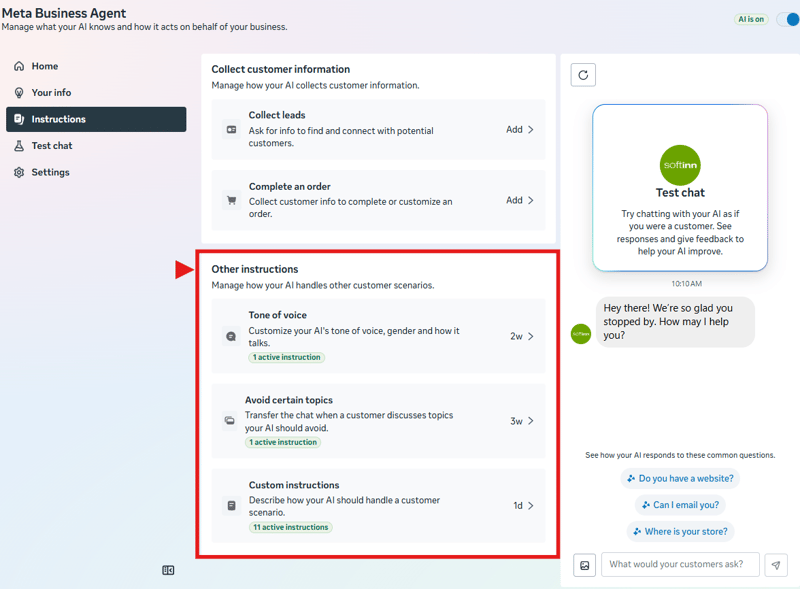
After entering your basic property details, navigate to Instructions to manage how the AI collects guest information. Next, open Other Instructions, this is where you will paste the custom rules, tone settings, and handoff boundaries from our Meta Business Agent Instruction Sheet.
What you can customize
In Meta Business Suite, navigate to All tools → Meta Business Agent → Instructions → Other instructions.
-
Tone of voice (Personality).
-
Add instructions so the AI sounds like your hotel: warm and casual for a beachside guesthouse, crisp and formal for a city business hotel. Tell it to keep replies short, answer in the guest's language, and never over-promise. Read the Personality setting first, then match it to how your front desk actually talks.
-
-
Topics to avoid (Handoff).
-
You can tell the AI to stop and pass the chat to a human on any topic you choose. Custom pricing is the classic one: flag it so that when a guest asks for a special rate, a group deal, or a long-stay discount, the AI hands the chat to you instead of guessing a number it cannot honour. Do the same for refunds and complaints. Read the Handoff setting, list your own no-go topics, and let a person take those.
-
-
Custom instructions (formatting and set replies).
-
Tell it how to format and what to say at specific moments. For example: keep answers to two or three short lines, use a simple list for directions, and after a guest submits an enquiry or is sent to the booking link, send a warm confirmation with the next step ("Thanks, we've got your enquiry. You'll hear from us within the hour, or book instantly here: [link]"). Write the instructions that fit your workflow and ignore the rest.
-
We've built a Hotel Meta Reply Kit that addresses the questions hotel guests usually ask.One download, two ready-to-paste templates:
- Hotel FAQ Template: Questions → fixed answer for your Automations
- Meta Business Agent Instruction Sheet: tone, topics to avoid, and custom instructions for your AI
The coaching loop (train it over time)
- One policy, one set of property details, one set of directions. If the same fact lives in three places and they disagree, the AI will pick the wrong one.
- Prefer settings that keep answers grounded in the information you provided.
- Check the tone you set. In testing, confirm it actually sounds the way you told it to under Personality.
- Test as a guest. Message your own Page as if you were a traveller. Ask the awkward questions: late check-in, a room for five, "is it worth staying here." Watch where it hesitates or invents.
- Fix the source. When an answer is wrong, do not correct that one message. Correct the knowledge document so every future guest gets the right answer.
*Note: The source here refers to the information provided during the initial page setup, before the Custom Instructions section.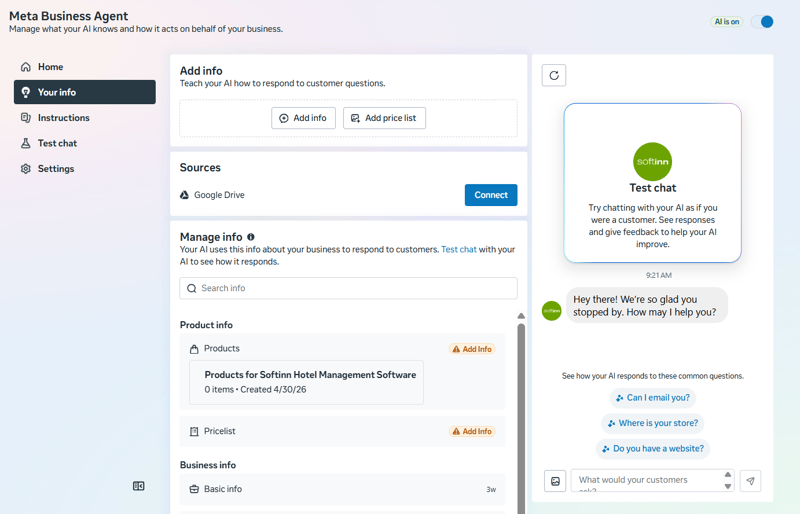
- Confirm your handoff rules fire. Ask for a special rate, a refund, and a room for this weekend. Each should hand off to you or to your booking link.
- Review weekly for the first month. Messages the AI sends carry an "AI" label. Read the real chats each week, find the weak answers, and fix them at the source. After a month, it will need far less attention.
Common mistakes to avoid
- Thin information. A one-line description produces confident, wrong answers. Give it a full FAQ.
- No human handoff for money or complaints. Never let AI improvise a refund or argue with an upset guest.
- Letting it quote live availability. It cannot see your rooms or rates, so keep bookings on your booking link.
Where I stand
I believe the Meta AI agent is genuinely useful for hotels, clearing the repetitive questions that clog your inbox. It is a great front-desk assistant for facts. But it is not a booking system.
The limit is simple. Meta Business Agent answers from the static document you upload. It does not see your live availability or real-time rates. So "Do you have a family room this weekend, and how much?" is a question it cannot safely answer. That is where a booking engine connected to your PMS takes over, showing real availability and letting the guest book direct in the same flow.
If a hotel does not use a booking engine, it is hard to set the AI up to answer well. The same goes for cancellation policy, property details, and guest booking modifications: with no single source behind them, the AI has nothing reliable to draw from. Without a booking engine, you cannot link them directly to your website; the information all needs to be scattered across your head and different OTA extranets, each with its own rules, so there is nothing clean to teach the AI from. A booking engine gives you one source of truth: one policy, one set of property details, and direct bookings your team can actually amend.
That is exactly the gap we built Adam to fill.
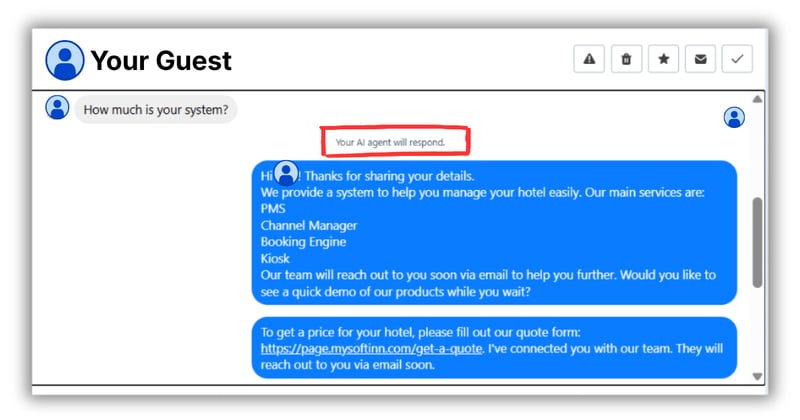
Adam is Softinn's AI reservation agent, live in the Booking Engine: it picks up booking enquiries and guides guests straight to a direct reservation, backed by a booking engine that shows real availability and rates for their dates. So the two play different roles.
Let Automation and Meta business agent clear the everyday FAQs at the top of the funnel, and let Adam step in the moment a guest is ready to book, pointing them to your direct booking link where the reservation actually happens, and where your margin lives.
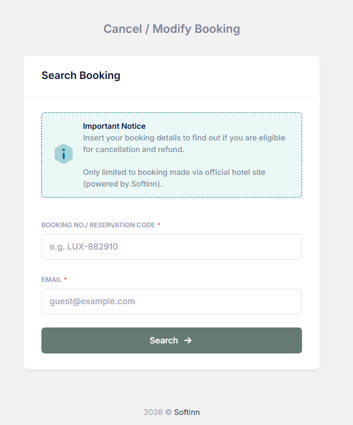
And because a direct booking lives in your own system, a guest can cancel or change their booking details themselves through a self-service link like be.mysoftinn.com/guest/cancel-booking, which your AI can simply hand over.

What does it cost?
When integrating a Meta Business Agent, your overall cost depends entirely on your business size and setup method.
Quick Visual Example
SME Route: A local boutique owner replies to Instagram or WhatsApp DMs directly from their iPhone using the free Meta Business Suite app.
API Route: A major airline handles 50,000 WhatsApp messages an hour. The AI checks flight databases instantly, and transfers complex cases to 500 different live agents sitting in a centralized call center.
| Tier / Setup | Platform Route | Pricing Structure |
| Small & Medium Businesses (SMBs) | Meta Business Suite / WhatsApp Business App / Instagram Pro |
Free activation for standard AI features. Standard manual human support responses are subject to Meta's per-message rates.
|
| Enterprise / Platform API | WhatsApp Business Platform API |
$2.00 per 1M tokens ($0.04–$0.05/response) for AI computation, plus standard WhatsApp Business conversation delivery fees based on country and category. |
Frequently asked questions
-
Is it free?
-
Yes, it is free to start for small hotels using Meta Business Suite, Instagram Pro, or the WhatsApp Business app. For enterprise setups using the WhatsApp Business Platform API, AI computation is billed at $2.00 per 1 million tokens (starting 1 August 2026) plus applicable WhatsApp messaging rates. Automations remain free.
-
-
Can it take a booking?
-
No. It answers from a static document and cannot see live availability or rates. Send booking-ready guests to a direct booking link backed by your PMS.
-
-
Do I need a booking engine to use it?
-
Not to switch it on. But without one, it has no reliable source for live availability, rates, or booking changes, so those questions have nowhere to go. Connect a booking engine so booking-ready guests get real availability and can book direct, and so the Agent has a clean single source to point them to.
-


Tai Pei Shi
Hi, I am Pei Shi. I am a Technopreneurship student and digital marketing intern in Softinn.
Comments
Recent Posts
Hotel Wi-Fi PMS Integration: Give Every Guest Their Own Password, Automatically
AI Won't Run Your Hotel. But It Can Help You Run It Better.
Google AI Mode for Hotels: What Hotel Owners Need to Know
When the Minimum Wage Goes Up, What's Your Hotel's Next Move?
Why Hotels Should Offer Reserve Now, Pay Later to Guests