
Choosing the right hotel management system isn't about finding the one with the most features. What matters more is whether the system fits the way your hotel operates, is easy for your team to use, and helps reduce manual work.
For independent hotels, boutique hotels, and smaller properties, the requirements can be very different from those of large hotel chains. A system that is too complex can make daily operations harder, especially during busy hours.
Based on what we've seen from over 2,000 hoteliers using Softinn across Malaysia and Southeast Asia, there are a few key things worth considering when choosing a hotel system.
This guide covers what to look for before deciding which system is right for your property.
Step 1: Define What Your Hotel Needs
-png.png?width=477&height=632&name=infographic-7-steps%20(1)-png.png)
Before comparing different systems, look at how your hotel operates day to day.
Where is your team still doing things manually? Which tasks take the most time or often lead to mistakes?
Some common challenges we hear from hotels include:
- Manually updating room availability across multiple OTAs
- Not knowing which rooms are clean and ready for check-in
- Checking payment status separately for different bookings
- Preparing reports manually at the end of the month
This gives you a clearer idea of what you actually need from a hotel system.
Then, consider two things:
Is it easy for your staff to use?
Especially during busy hours. Your team should be able to handle daily tasks without constantly referring to a manual or asking for help.
Does it fit the size and needs of your hotel?
A 30-room hotel may not need a complex enterprise system designed for a resort with hundreds of rooms.
Step 2: Focus on the 4 Features That Actually Matter
I believe feature count is a vanity metric. Vendors sell features; hotels need outcomes. A system with 40 features your team never touches is worse than one with 10 they use every day.
-
Real-time reservation management
-
Every booking: direct, OTA, walk-in all in one calendar. Softinn PMS centralises bookings from your website, Agoda, Booking.com, and walk-ins into one dashboard, so availability is always accurate.
-
-
Fast check-in and check-out
-
Peak hours mean one or two staff handling multiple arrivals. Count the clicks a check-in takes during the demo.
-
-
Live room status
-
Front desk should see clean/dirty / ready-for-early-check-in without walkie-talkies. Housekeeping updates should reflect instantly.
-
-
Accurate billing with payment integration
-
Folios should calculate multi-night stays and taxes automatically, with local payment gateway support built in.
-
Step 3: Check the Channel Manager (This Is Where Double-Bookings Happen)
-
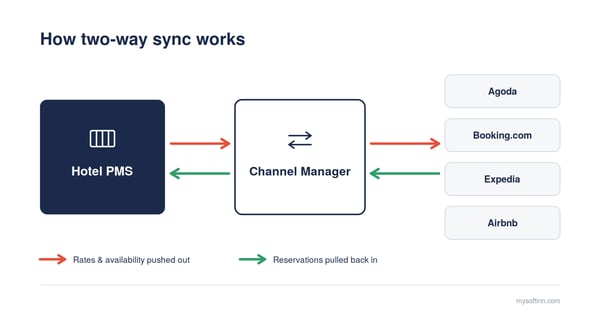
Two-way sync is non-negotiable.
-
One-way connections create the lag that causes double-bookings. Your channel manager must push rate and availability changes to OTAs and pull new bookings back automatically.
- Today, 49.76% of Softinn customers run PMS connected to our Channel Manager. Softinn Channel Manager syncs two-way with Agoda, Booking.com, Expedia, and Airbnb.
-
-
Don't be impressed by connection counts.
-
200 global OTA connections mean nothing if the Agoda integration is weak. For Southeast Asian hotels, deep integration with the channels your guests actually use matters more.
-
-
Get your room mapping right before you connect anything.
-
Most sync errors don't come from the software, they come from room types that don't match between your PMS and your OTA listings. A "Deluxe King" in your PMS mapped to the wrong room on Agoda means overselling a room you don't have.
-
Don't have a PMS yet? Use this template to map every room type across Agoda, Booking.com, Expedia, and Airbnb in one sheet, so your channel manager setup is clean from day one.
Step 4: Prioritise Direct Bookings
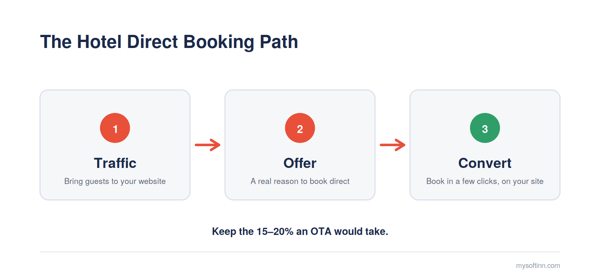
Every direct booking saves you 15–20% in OTA commission. Your booking engine should:
- Complete reservations on your own website, no third-party redirects
- Work smoothly on mobile
- Support promo codes exclusive to direct bookers
The proof it works: 56.94% of softinn customer currently take direct bookings through Softinn Booking Engine. Of those, 43.52% now run without relying on OTAs at all, their own website is a real booking channel, not a brochure. That's the outcome of treating direct bookings as a system: traffic → offer → convert.
Softinn's traffic → offer → convert framework for growing commission-free bookings.
Step 5: Verify Integrations Before You Sign
Ask for proof of working connections with:
- Your OTAs - your specific channels
- Accounting software - for Malaysian hotels: SQL Accounting, AutoCount, Bukku
- Door locks - Softinn integrates with 60+ door lock brands,(including Intego, Orbita, LEVEL and TTLOCK) so keycard encoding happens during check-in
- Payment gateways - local options, not international-only
If a vendor gives vague answers about integration, expect problems after purchase.
Step 6: Evaluate Support Like Your Business Depends on It
Hotels run 24/7. When your system breaks during check-in rush, a support team in a distant time zone is useless.
Ask every vendor:
- What time zone is supported?
- What's your first-response time?
- Is onboarding and training included, or extra?
Softinn includes onboarding support, self-paced video guides, and monthly group training at no extra cost.
Step 7: Compare 3-Year Total Cost, Not Monthly Price
Hidden costs to ask about:
- Setup and data migration fees
- Training charges
- Per-booking or per-transaction fees
- Charges for channel manager or booking engine as "add-ons"
Some vendors advertise a low base price, then charge separately for essentials. Softinn's subscription includes PMS, channel manager, and booking engine together.
Also check contract terms, avoid long lock-ins. Monthly billing or short commitments let you leave if the system doesn't fit.
Our stand: If you're choosing hotel software purely on price, you're treating a strategic tool like a commodity and you'll get commodity results. The cheapest system that causes one double-booking a month costs you more than the right system ever will. Compare on fit and outcome first, price second.
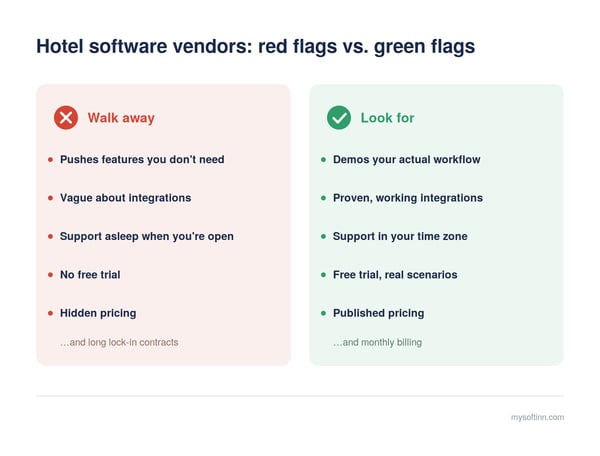
Red Flags That Should Disqualify a Vendor
- Pushing enterprise feature packages on a small property
- Vague answers about OTA or accounting integration
- Support hours that don't match hotel hours
- No free trial, or a demo that avoids your real workflows
How to Test Before You Buy
- Demo your workflow, not theirs. Ask them to run a check-in with your actual rate structure. Count the clicks.
- Trial with real scenarios. Let your front desk staff use it and give feedback, they'll spot usability issues demos hide.
- Talk to similar hotels. A reference from a 200-room city hotel tells you nothing about running a 30-room resort.
Takeaways
Don't choose the software with the most features. Choose the one that fits how your property already operates, reduces daily friction, and grows with you.
- Start with your workflow, not the feature list. The software should match how your front desk actually operates.
- Choose cloud-based. No hardware costs, automatic updates, and you can manage your property from anywhere.
- Two-way OTA sync is non-negotiable. Sync lag is what causes double-bookings and clean room mapping is what makes sync reliable.
- Grow direct bookings. Every direct booking saves you 15–20% in OTA commission.
- Demand local support. A help desk in your time zone matters most when the system breaks during check-in rush.
- Compare 3-year total cost, not monthly price. Setup fees, add-ons, and per-transaction charges change the math.
FAQs
-
What is the most important feature in hotel management software for small hotels?
-
Real-time reservation sync across all channels. When PMS, channel manager, and booking engine work as one system, you eliminate double-bookings and manual updates.
-
-
How long does it take to implement new hotel software?
-
Most cloud-based systems are operational within one to two weeks for small properties. Softinn is faster: a product tour takes about 30 minutes, and onboarding starts within a day using self-paced video guides, no need to wait for a scheduled training session.
-
-
Should independent hotels choose cloud-based or on-premise software?
-
Cloud-based, in nearly all cases. No hardware costs, automatic updates, remote access from any device, and backups handled by the provider.
-
-
How much should hotel management software cost?
-
Independent hotels typically spend USD 100–300 per month for a complete stack (PMS + channel manager + booking engine). Softinn's all-in-one plan sits at the lower end of that range, see Softinn's published pricing.
-
-
How do I know if the software will integrate with my existing systems?
-
Ask for confirmation or research on the website to ensure it works with your specific OTAs, accounting software, and door locks.
-
Read Also


Tai Pei Shi
Hi, I am Pei Shi. I am a Technopreneurship student and digital marketing intern in Softinn.
Comments
Recent Posts
Who Really Owns Your Agoda Account? 7 Things to Lock Down Before Hiring a Revenue Manager
Hotel Wi-Fi PMS Integration: Give Every Guest Their Own Password, Automatically
AI Won't Run Your Hotel. But It Can Help You Run It Better.
Google AI Mode for Hotels: What Hotel Owners Need to Know
When the Minimum Wage Goes Up, What's Your Hotel's Next Move?