I am a tech founder and the CEO of Softinn. I notice that my clients (mostly small hotels) are missing out a lot simply because they don't know how to use Google Analytics (GA). Hence this post. Here’s a simple, hands‑on guide to get you started.
This post is not about how to create and install a GA account. For that, you may refer to this blog post compiled by my colleague Ayu. This post is about how you relate your website traffic and booking sales to marketing campaigns you're running. So, you have some clue what works and what doesn't. Instead of shooting in the dark, I hope this post will help you set up a feedback system for your marketing activities. After all, a data-driven business is better than a roll-a-dice business.
If you run the hotel marketing for the hotel owner. This post will help you measure your work outcomes and justify increasing marketing spend (show it to your boss to request a marketing budget). Also, if you engage influencers to promote your hotel, this article will help you identify which influencers are worth your money and consider re-hiring them for more.
The Basics
Before we start, here is the basic knowledge that you will need to know. Feel free to skip if you've learned this elsewhere.
-
GA: Google Analytics. It is a free tool to measure your website traffic. Basically, it answers how many people visited your website, what they did there, and where they came from.
- Campaign. It's basically a project or theme of your marketing effort. It helps you identify marketing efforts. For example, if you spent on Facebook advertising, you would refer to it as "Facebook Ads Campaign". If you hire infuencer A and influencer B to promote your hotel, you can name them as "Influencer Campaign" OR if you want to be specific, you can name it as "Influencer Campaign A" and "Influencer Campaign B" too. Don't have to go crazy for the name of the campaign, start simple; you will find your way to a better name for your campaign as you revisit and read the report every week.
- Campaign attributes. The attributes basically help you to categorise your campaigns. I have a table in this blog post to illustrate the idea. For now, consider this as a way for you to tag a campaign and to categorise your campaign.
URL Parameter. The "?, &, ="
It gets a bit technical here, but it's not hard to learn. In order to know how to tag your campaign, you will first learn how URL parameters work.
For any URL, the URL parameters are text that comes after the "?" question mark.
For example, the text highlighted below in red is the URL parameters.
https://yourhotel.com/rooms/?utm_source=facebook&utm_medium=social&utm_campaign=summer_promo
We can chain as many parameters as we want in the URL by adding the "&" character. The value of the parameter is what comes after the "=" sign.
For example, the text highlighted in orange below is the URL parameter chain. The blue-highlighted text shows the parameter values.
https://yourhotel.com/rooms/?utm_source=facebook&utm_medium=social&utm_campaign=summer_promo
The same URL again highlights the ?, & and = signs.
https://yourhotel.com/rooms/?utm_source=facebook&utm_medium=social&utm_campaign=summer_promo
💰 Pro tip: Google Analytics is case-sensitive. So, don't be consistent in your letter case.
The Report: How to Check the Campaign's Performance?
Before elaborating further on how to tag your campaign, let me first show you the result - the report.
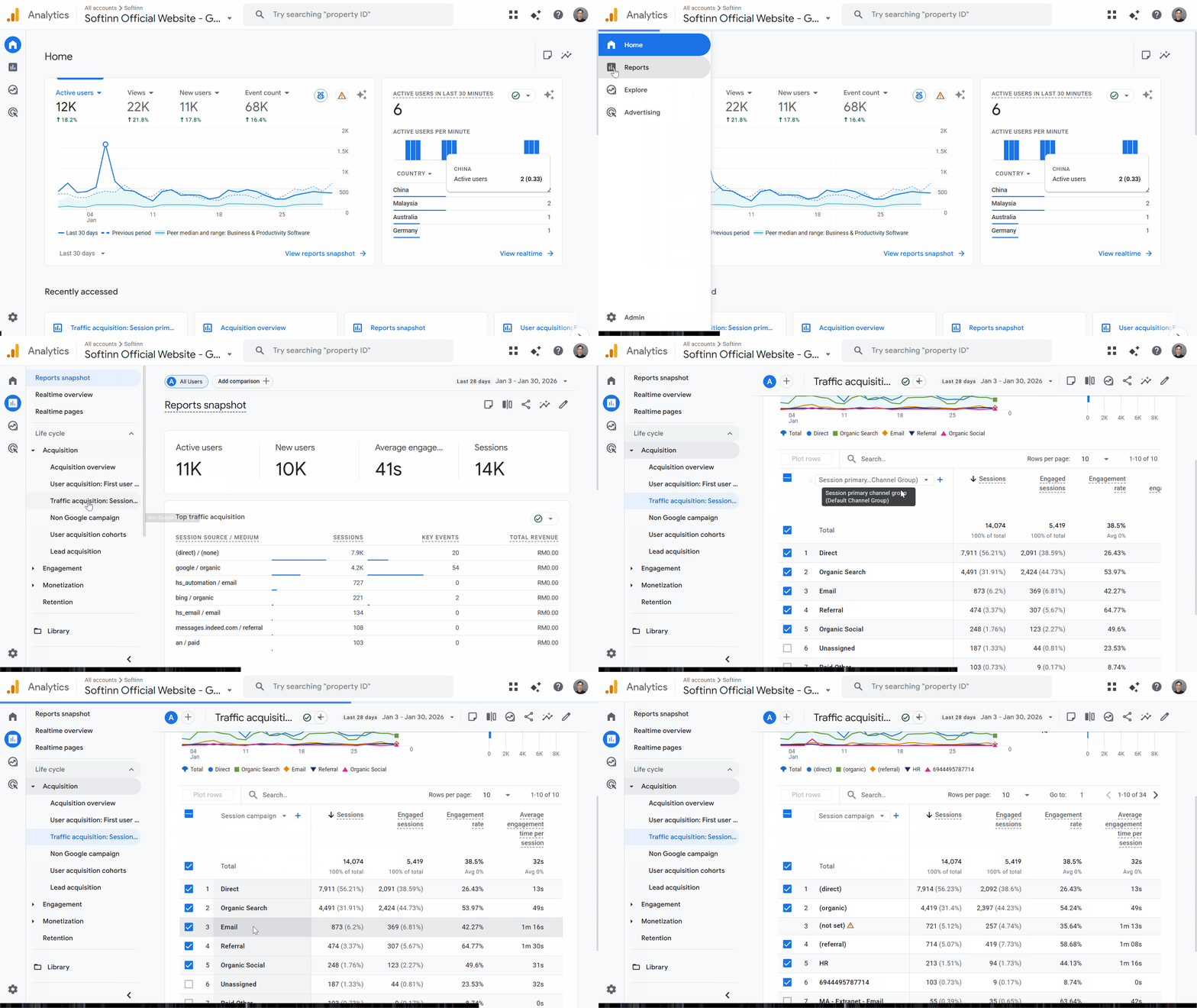
You can read the report in Google Analytics by navigating to Reports > Acquisition > Traffic Acquisition.
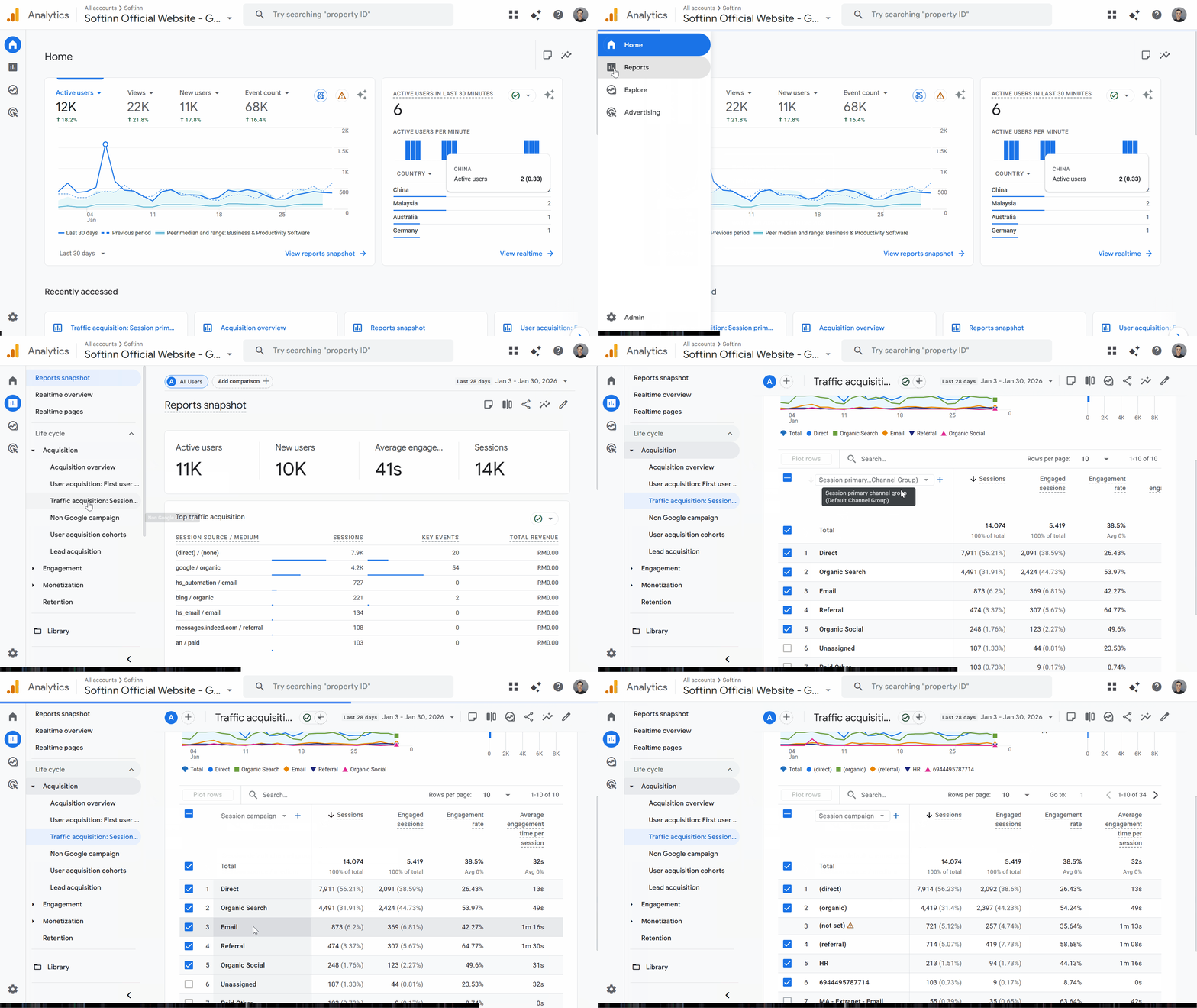 In the report, you will find the number of sessions (for now, assume each session represents a user to simplify the calculation). Then, you can find out how long they spend on your site. Use this as a baseline to assess the campaign's effectiveness. More sessions mean the campaign drives more users. Higher time spent on your site means the users found your website engaging (they spent time browsing).
As an example. Imaging an campaign sends you 10k sessions, but the time spent is 5 seconds - this is bad. It may indicate the campaign is incorrectly advertising your website. Imagine someone advertises your website by offering a free iPhone; that gets traffic, but users will find out otherwise within 5 seconds, so this is a poor campaign. I am exagerating but you get the idea.
What to Look for in the Report?
There is a lot of information in the GA report. Here's how I start - asking the right questions. By asking these questions, you will find the answers and learn how to get more information from GA. That's how we learn.
To make it better, GA introduced AI chat so that you can ask your questions, and GA will answer them.
Below are the questions that I recommend you start with:
-
Which marketing campaign has been the most effective in the past 12 months?
- Which marketing campaign has been the least effective in the past 12 months?
- For the traffic that was not categorised, where did this traffic come from? Can I tag them?
Guide to Tag Your Marketing Campaign
We've covered the basics above, and you're convinced to start. Here's how you set up and start tracking. Enjoy.
Step 1 — Use Campaign URL Builder to Tag Your Link
You create a tracking link by adding UTM parameters to your normal URL. These parameters tell Google Analytics where the visitor came from.
📌 Use Google’s tool here:
👉 Google Campaign URL Builder – https://ga-dev-tools.google/campaign-url-builder/
Fill in these fields:
-
Website URL – the page you want visitors to land on.
-
utm_source – where the visitor clicked the link (e.g., facebook, newsletter).
-
utm_medium – the type of marketing (e.g., email, social, cpc).
-
utm_campaign – your campaign name (e.g., summer_promo).
That tool will generate a URL like this:
https://yourhotel.com/rooms/?utm_source=facebook&utm_medium=social&utm_campaign=summer_promo
When someone clicks that link, GA will record the source, medium, and campaign.
Step 2 — Use the Tagged Link in Your Marketing
Use the tagged link in:
-
Facebook/Instagram posts
-
Email newsletters
-
WhatsApp promotions
-
Google or Meta ads
-
QR codes on flyers or banners
Tip: Don’t use UTMs on links inside your own website — only for external traffic. Otherwise GA may overwrite your original source tracking.
Step 3 — Check Your Campaign Results in Google Analytics
Once people click your tagged links and visit your site, GA will start showing campaign data.
In Google Analytics 4 (GA4):
-
Go to Reports
-
Open Life cycle > Acquisition > Traffic acquisition
-
You’ll see traffic grouped by channels by default
-
Change the first column to Session source / medium or Session campaign to see your tagged campaign data
This will show you how many visitors came from each source/medium/campaign you tagged.
Example of Campaign Tagging for a Small Hotel
| Purpose / Campaign | URL Source (utm_source) | Medium (utm_medium) | Campaign Name (utm_campaign) | Example Tagged Link |
| Facebook Ad – Summer Promo | cpc | summer_promo | https://yourhotel.com/rooms/?utm_source=facebook&utm_medium=cpc&utm_campaign=summer_promo | |
| Instagram Post – Last Minute Deal | social | last_minute_deal | https://yourhotel.com/rooms/?utm_source=instagram&utm_medium=social&utm_campaign=last_minute_deal | |
| Email Newsletter – VIP Guests | newsletter | vip_offer | https://yourhotel.com/rooms/?utm_source=newsletter&utm_medium=email&utm_campaign=vip_offer | |
| Flyer QR Code – Hotel Lobby | flyer | offline | lobby_qr | https://yourhotel.com/rooms/?utm_source=flyer&utm_medium=offline&utm_campaign=lobby_qr |
| Softinn Booking Engine Launching | tiktok | social | softinn_booking_engine |
https://yourhotel.com/rooms/?utm_source=tiktok&utm_medium=social&utm_campaign=softinn_booking_engine |
| Softinn Booking Engine Launching | newsletter | softinn_booking_engine |
https://yourhotel.com/rooms/?utm_source=newsletter&utm_medium=email&utm_campaign=softinn_booking_engine |
If you wonder what is the difference between UTM Source and UTM Medium, here's the convention. I was confused when I first started. Here’s a simple way to think about it.
Source = where the traffic comes from
Medium = how the traffic comes
It's okay to have different URL parameters for the one campaign. Yes, I was confused about this too. Imagine you subscribe to the Softinn hotel booking engine and you're promoting it to your guests so they can book directly with you. Obviously, you will reach your guests through different channels (a.k.a UTM Source), you will announce on your TikTok account, and you will send a newsletter announcing the launch to your regular customers. So, it's okay to create different URL parameters for the same campaign (a.k.a. UTM Campaign).
Softinn Booking Engine extends your Marketing Tracking
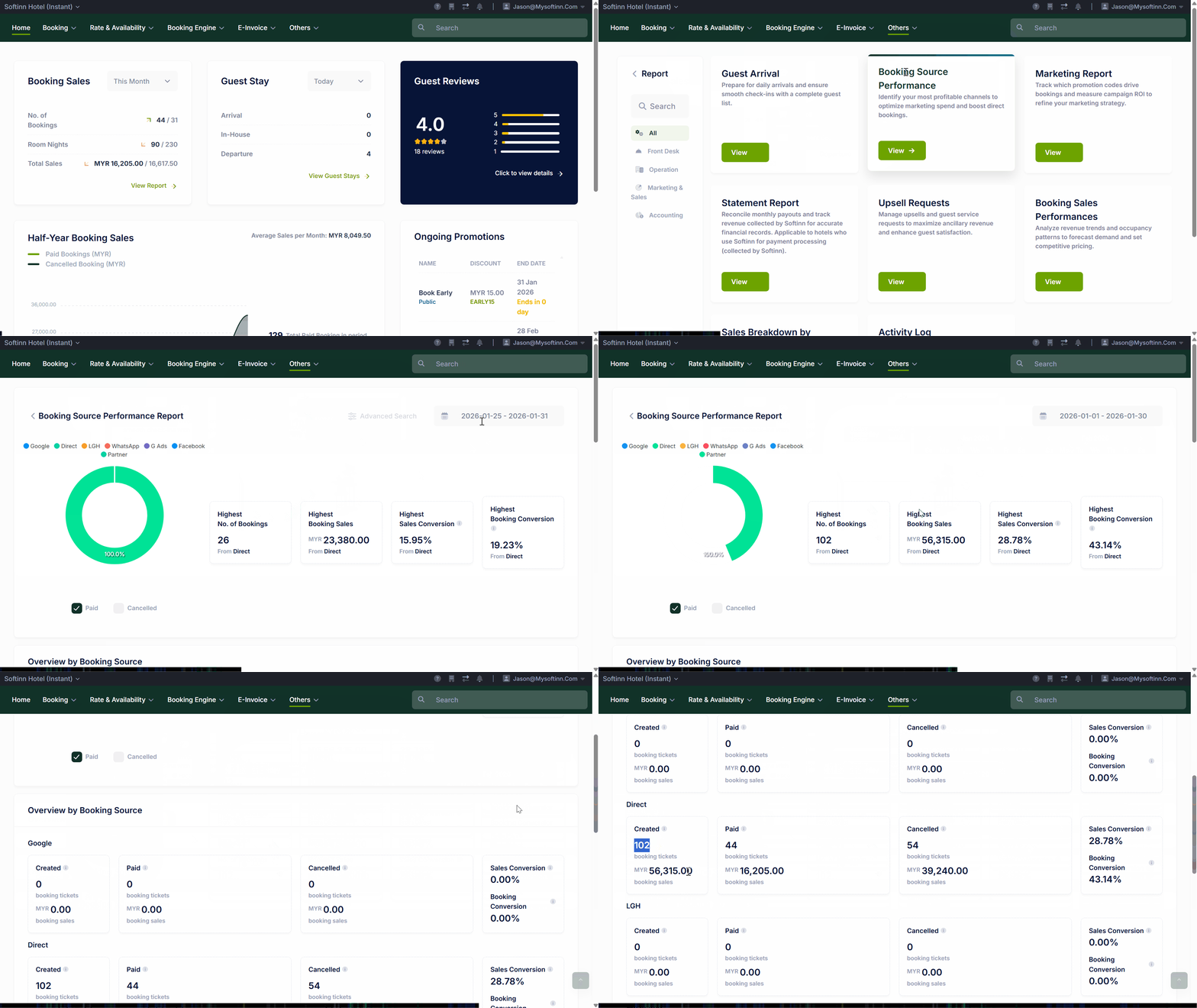
After tracking the traffic to your website, it's natural that you wonder how this traffic uses your booking engine. Worry not, Softinn has covered this. The knowledge you used above is applicable to our booking engine too! So, you can now track the effectiveness of your marketing campaign in reaching your customers to its effectiveness in converting to sales dollars.
 Lastly, If there are areas you want to learn more about, tell me. Marketing, operations, pricing, or technology — I’m learning alongside you. This blog is not about theory. It’s about what actually works for small hotels. Share your questions and challenges in the comments, and we’ll figure them out together.


JeeShen
JeeShen is the CEO of Softinn, a SaaS company helping hotels run smoother and smarter. He’s not a professional blogger—just a tech and hospitality enthusiast who loves sharing thoughts, insights, and a few stories from the frontlines of the industry.
Comments
Recent Posts
When the Minimum Wage Goes Up, What's Your Hotel's Next Move?
Why Hotels Should Offer Reserve Now, Pay Later to Guests
API, AI, Integration: Should Your Hotel Build or Buy?
The Best AI Preparation Your Hotel Can Do Has Nothing to Do With AI
The e-Invoice Exemption Increased to RM3Million : What It Means For Your Hotel?